
10 Best monday.com Alternatives in 2026: Why Systeme.io Wins
Introduction: Why Teams Are Moving Beyond monday.com
monday.com is powerful. But powerful comes with a price tag that climbs fast.
If you're here, you've probably hit one of these walls: pricing that scales aggressively per user, overwhelming feature bloat that confuses your team, a learning curve that requires weeks of training, lack of integrated marketing automation, and the gnawing feeling that you're overpaying for features you'll never use.
You're not alone. In 2026, teams are ditching monday.com for platforms that offer better value, easier setup, and more integrated functionality—especially if you're also managing marketing, email campaigns, sales funnels, or customer relationships.
The shift is real. Teams want one platform that handles project management plus the business operations that matter: CRM, automation, funnels, and reporting—all without juggling six different subscriptions.
This guide breaks down 10 proven monday.com alternatives, with honest pricing, real feature comparisons, and a clear recommendation for which platform works best for your business model.
What you'll find below:
✅ Systeme.io — Best overall all-in-one alternative
✅ Asana — Best for complex project workflows
✅ ClickUp — Best for feature-rich customization
✅ Trello — Best for simplicity and visual management
✅ Notion — Best for all-in-one workspace
✅ Jira — Best for software development teams
✅ Wrike — Best for enterprise project management
✅ Smartsheet — Best for structured workflows
✅ Microsoft Project — Best for complex resource allocation
✅ Basecamp — Best for small team collaboration
Let's dive in.
Quick-Scan Alternative List
• Systeme.io — Best overall all-in-one alternative (Project management + CRM + marketing + automation)
• Asana — Best for teams managing complex workflows across departments
• ClickUp — Best for customizable project management and team collaboration
• Trello — Best for visual, simple project and task management
• Notion — Best for all-in-one workspace combining docs, databases, and projects
• Jira — Best for software development and agile teams
• Wrike — Best for enterprise-level project management and resource planning
• Smartsheet — Best for structured, spreadsheet-style project tracking
• Microsoft Project — Best for complex resource allocation and enterprise scheduling
• Basecamp — Best for small teams prioritizing simplicity and communication
Alternative #1: Systeme.io — Best Overall monday.com Alternative
Why Systeme.io Wins Against monday.com
If monday.com is just a project management tool, Systeme.io is the entire business operating system—and it costs a fraction of what you're likely paying monday.com.
While monday.com excels at task and project visualization, it's missing the bigger picture: email marketing, sales funnels, customer relationship management, and automated workflows that actually drive revenue.
Systeme.io bridges that gap. It's built for entrepreneurs, agencies, and growing teams who need project tracking plus the marketing and sales infrastructure to actually grow.
Who it's for:
Solopreneurs and small teams scaling from 1–50 people
Digital agencies managing client projects and campaigns
Ecommerce and SaaS businesses selling products or services
Teams tired of subscribing to monday.com plus Pipedrive plus ActiveCampaign plus Zapier
Anyone switching FROM monday.com who also needs marketing automation
Core Features & Benefits
✅ Project & Task Management — Kanban boards, timeline views, workload tracking (similar to monday.com, but integrated with everything else)
✅ Integrated CRM — Manage contacts, deals, and customer journeys without leaving the platform
✅ Email Marketing & Automation — Build triggered sequences, automated workflows, and broadcast campaigns without a separate tool
✅ Sales Funnels & Landing Pages — Drag-and-drop funnel builder with built-in checkout and upsells (something monday.com can't do)
✅ Marketing Automation — Create complex workflows: form submissions → email sequences → sales tasks → customer delivery
✅ Ecommerce Ready — Accept payments, manage products, handle inventory, and deliver digital products all in one place
✅ SMS & WhatsApp — Reach customers on their preferred channels beyond email
✅ Webinar & Course Hosting — Host automated webinars and deliver digital products directly on the platform
✅ Built-in Integrations — Connect with 1,000+ apps via Zapier, native integrations with Stripe, PayPal, Slack, and more
✅ Affiliate Management — Built-in affiliate program tools for expanding through partners
Why Systeme.io Beats monday.com
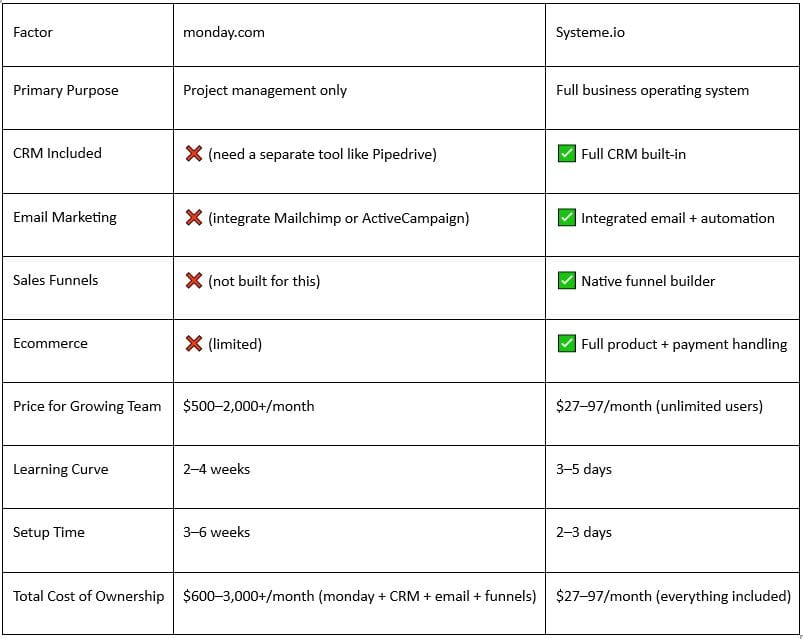
The reality: monday.com is excellent at one thing (project management), but you're paying enterprise prices for a point solution while missing critical business functions.
If your business involves selling anything (digital products, services, coaching, courses, ecommerce), Systeme.io isn't just cheaper—it's fundamentally better positioned.
Pricing Breakdown
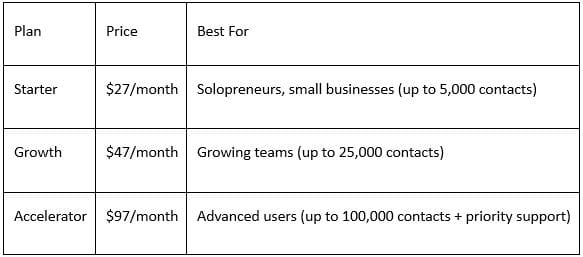
All plans include: Project management, CRM, email, funnels, landing pages, courses, webinars, SMS, WhatsApp, integrations, and affiliate management.
No hidden fees. No per-user costs. No surprise add-ons.
Compare that to monday.com:
Starter plan: $99/month (up to 5 projects)
Standard plan: $199/month (unlimited projects, one user)
Pro plan: $299/month (3 users)
Enterprise: Custom pricing
Just getting to 10 users costs 2,990+/month on monday.com. On Systeme.io, it′s still still 97/month—and you get CRM, email, funnels, and courses included.
Comparison: Switching From monday.com to Systeme.io
What you'll gain:
Unified dashboard (stop logging into 5 different tools)
90% cost reduction for small to mid-size teams
Marketing automation (funnels, email, SMS)
Built-in CRM for customer management
Ecommerce capabilities (accept payments, deliver products)
Faster team onboarding (simplicity beats complexity)
Native course and webinar hosting
What you won't have:
monday.com's advanced automations (if you have extremely complex, conditional workflows)
Gantt charts (Systeme.io has timelines, but not Gantt)
Portfolio-level resource planning (for 100+ person enterprises)
Verdict: Unless you're a 100+ person enterprise with incredibly complex, interconnected project workflows, Systeme.io gives you more business value at a fraction of the cost.
14-day free trial. No credit card required. Get instant access to projects, CRM, email, funnels, and more.
Alternative #2: Asana — Best for Complex Project Workflows
Asana is monday.com's most direct competitor. Both are "work OS" platforms with visual project management, but Asana leans harder into cross-team workflows and complex dependencies.
Strengths:
Dependency tracking — Map how tasks depend on each other
Portfolio management — Roll up projects into programs and portfolios
Timeline/Gantt charts — Visual project scheduling
Team collaboration — Comments, file sharing, approval workflows
Workload balancing — See which team members are over-allocated
Free plan — Genuinely useful for small teams and projects
Weaknesses:
Pricing scales per user — Similar pain to monday.com as teams grow
No marketing automation — You'll still need separate email/CRM/funnel tools
Steep learning curve — Requires training for teams
Not an all-in-one — Better at projects than business operations
Reporting is basic — Doesn't connect project work to revenue
Pricing:
Free — Up to 15 team members, basic features
Starter — $119/month (5 team members)
Advanced — $199/month (unlimited team members)
Enterprise — Custom pricing
Best choice if: You have complex project workflows and can justify the per-user cost.
Alternative #3: ClickUp — Best for Feature-Rich Customization
ClickUp is the kitchen-sink alternative to monday.com. If you want every possible project management feature, ClickUp delivers—sometimes to the point of overwhelming new users.
Strengths:
Highly customizable — Adjust virtually every aspect of the platform
Multiple views — List, board, timeline, calendar, table, workload, etc.
Time tracking built-in — Track hours directly in tasks
AI assistant — Generates task summaries and automated updates
Free plan is generous — Actually useful for small teams
Integrations — Connects to 1,000+ tools via Zapier and native integrations
Affordable — Cheaper than monday.com and Asana at comparable features
Weaknesses:
Interface feels cluttered — Too many options can paralyze new users
Steep learning curve — Requires videos and documentation to master
No marketing automation — Still need separate email/CRM tools
CRM is basic — Not as robust as dedicated CRM platforms
Support — Can be slow to respond
Pricing:
Free — Basic features, unlimited users
Plus — $99/month (unlimited features, unlimited users)
Business — $199/month (advanced features)
Enterprise — Custom pricing
Best choice if: You want maximum customization and features at a lower cost than monday.com.
Alternative #4: Trello — Best for Simplicity and Visual Management
Trello is the minimalist alternative. If monday.com feels bloated and you just want to move cards across columns, Trello is refreshingly simple.
Strengths:
Simple, intuitive interface — Anyone can use it immediately
Free plan is excellent — Unlimited cards, multiple boards, basic automation
Fast onboarding — Teams productive within hours, not weeks
Kanban-focused — Perfect for visualizing task flow
Mobile app — Works great on phones and tablets
Affordable automation — Butler automation is cheap compared to monday.com
Weaknesses:
Limited for complex projects — No dependencies, Gantt charts, or advanced scheduling
Not an all-in-one — You'll need separate tools for CRM, email, funnels
Reporting is basic — Can't easily see project health or resource allocation
Scaling is clunky — Teams outgrow Trello quickly as projects multiply
No time tracking — Must integrate third-party tools
Pricing:
Free — Unlimited cards, 10 boards, basic automation
Standard — $6/user/month (unlimited boards, calendar view)
Premium — $12.50/user/month (custom fields, advanced automation)
Enterprise — Custom pricing
Best choice if: You want the simplest possible project management with minimal learning curve.
Alternative #5: Notion — Best for All-in-One Workspace
Notion is the wild card. It's not primarily a project management tool, but many teams use it as a lightweight alternative to monday.com for combined documentation, databases, and project tracking.
Strengths:
Truly all-in-one — Combine docs, databases, wikis, and projects in one workspace
Flexible structure — Build exactly what you need (no rigid templates)
Affordable — $10/person/month is cheap for what you get
Community templates — Thousands of free templates from users
No steep learning curve — Once you understand the basics, customization is intuitive
Excellent for knowledge management — Superior to most tools for storing company information
Weaknesses:
Not built for project management — Feels like a workaround, not a native solution
Performance can lag — Can be slow with large databases
No automation — Can't create complex workflows or automations
No marketing or CRM — Purely a workspace tool, not a business operating system
Reporting is limited — Can't easily pull project insights
Collaboration features — Basic compared to dedicated project tools
Pricing:
Free — Basic features, limited blocks
Plus — $10/person/month (unlimited blocks, better sharing)
Business — $20/person/month (team workspace, advanced features)
Enterprise — Custom pricing
Best choice if: You want a lightweight workspace combining docs, databases, and simple project tracking.
Alternative #6: Jira — Best for Software Development Teams
Jira is the dominant tool for agile software development. If you're managing sprints, backlog prioritization, and code deployments, Jira is the standard.
Strengths:
Agile methodology built-in — Sprints, backlogs, burndown charts all native
Developer integration — Connects directly to GitHub, GitLab, Bitbucket
Customization — Highly flexible for complex development workflows
Advanced reporting — Velocity, burndown, cycle time metrics
Scalable — Works for teams from 5 to 500+ developers
Security — Enterprise-grade permission controls
Weaknesses:
Steep learning curve — Designed for developers, complex for non-technical teams
Overkill for non-development work — Over-engineered for marketing or design teams
Pricing can be expensive —7–14 per user for cloud, custom pricing for enterprise
Not all-in-one — Still need separate tools for marketing, CRM, funnels
Interface feels dated — Not as modern as monday.com or Asana
Pricing:
Free — Up to 10 users, limited features
Standard — $7/user/month (unlimited projects)
Premium — $14/user/month (advanced workflows, portfolio management)
Enterprise — Custom pricing
Best choice if: You're a software development team managing sprints and code deployments.
Alternative #7: Wrike — Best for Enterprise Project Management
Wrike is positioned as the enterprise alternative to monday.com. It's built for large organizations managing multiple concurrent projects with strict governance requirements.
Strengths:
Enterprise resource planning — Allocate resources across dozens of projects
Advanced reporting — Executive dashboards and real-time visibility
Custom workflows — Build approval processes and governance workflows
Portfolio management — Align projects with business strategy
Compliance — SOC 2, HIPAA, and GDPR ready
Scalability — Handles 1,000+ team members across multiple departments
Weaknesses:
Expensive — Starts at $400+/month and scales significantly
Overkill for small teams — Over-complicated for <50 person companies
Steep learning curve — Requires dedicated training and change management
Not all-in-one — Still need separate CRM, email, and funnel tools
Interface complexity — Dashboard setup takes weeks to get right
Pricing:
Team — $400/month (20 users, basic features)
Business — $800/month (unlimited users, advanced features)
Enterprise — Custom pricing
Best choice if: You're a 100+ person enterprise with complex governance requirements.
Alternative #8: Smartsheet — Best for Structured, Spreadsheet-Style Workflows
Smartsheet is for teams who think in spreadsheets but want project management features. It combines the familiar grid layout with project capabilities.
Strengths:
Spreadsheet interface — Familiar to anyone who uses Excel
Form submissions — Capture data through forms that populate sheets
Automation workflows — Alert and conditional logic without coding
Control center — Dashboard aggregating multiple projects
Integrations — Connects with Microsoft Office, Salesforce, ServiceNow
Good for structured data — Excellent when data consistency is critical
Weaknesses:
Not intuitive for visual thinkers — Grid-based, not kanban or timeline-focused
Automation is complex — Less user-friendly than monday.com or ClickUp
Pricing is high — Per-user costs similar to monday.com
Not all-in-one — Still need separate marketing and CRM tools
Mobile experience — Better suited for desktop work
Pricing:
Standard — $99/month (3 team members)
Pro — $199/month (unlimited team members)
Business — $399/month (advanced automation, reporting)
Enterprise — Custom pricing
Best choice if: You're managing structured workflows that map to spreadsheets.
Alternative #9: Microsoft Project — Best for Complex Resource Allocation
Microsoft Project is the legacy enterprise standard for project portfolio management. It's powerful but designed for large organizations with dedicated project management offices (PMOs).
Strengths:
Gantt chart mastery — The gold standard for complex project scheduling
Resource management — Allocate resources across projects with advanced leveling
Enterprise integration — Connects with Microsoft 365 ecosystem
Portfolio management — Aggregate thousands of projects into portfolios
Advanced scheduling — Handle dependencies, constraints, and critical paths
Reporting — Generate compliance and governance reports
Weaknesses:
Outdated interface — Feels like legacy software compared to modern alternatives
Expensive — Often $30+/user/month plus enterprise licensing
Steep learning curve — Requires dedicated training and expertise
Overkill for most teams — Over-engineered for 95% of use cases
Not all-in-one — Still need separate CRM, email, and automation tools
Poor collaboration — Designed for PMOs, not cross-functional teams
Pricing:
Project Plan 1 — $10/user/month (cloud-based)
Project Plan 3 — $20/user/month (advanced features)
Project for Web — $10/user/month (modern interface)
On-premise — Custom licensing
Best choice if: You're a large enterprise with PMO-level project complexity.
Alternative #10: Basecamp — Best for Small Team Collaboration
Basecamp is the anti-monday.com. It's deliberately simple, focused on communication and organization over features and customization.
Strengths:
Extremely simple — Get started in minutes
Affordable flat rate — $99/month for unlimited projects and users (no per-user pricing)
Built for communication — Message boards, campfire chat, and check-ins
Good for small teams — 5–50 person teams thrive on Basecamp
Onboarding is quick — Teams productive immediately
No overhead — No complex workflows or customization needed
Weaknesses:
Not scalable — Falls apart with 100+ person teams
Limited project tracking — No Gantt, advanced dependencies, or resource management
No integrations — Purposefully minimal third-party tool support
Not all-in-one — Still need separate CRM, email, and marketing tools
No time tracking — Limited to to-do lists and milestones
Reporting is minimal — Can't easily see project health metrics
Pricing:
Standard — $99/month (unlimited projects, unlimited users, unlimited storage)
That's it. One plan. One price. Forever.
Best choice if: You're a small team that values simplicity and affordability over feature richness.
Feature Comparison Table: monday.com vs. All Alternatives
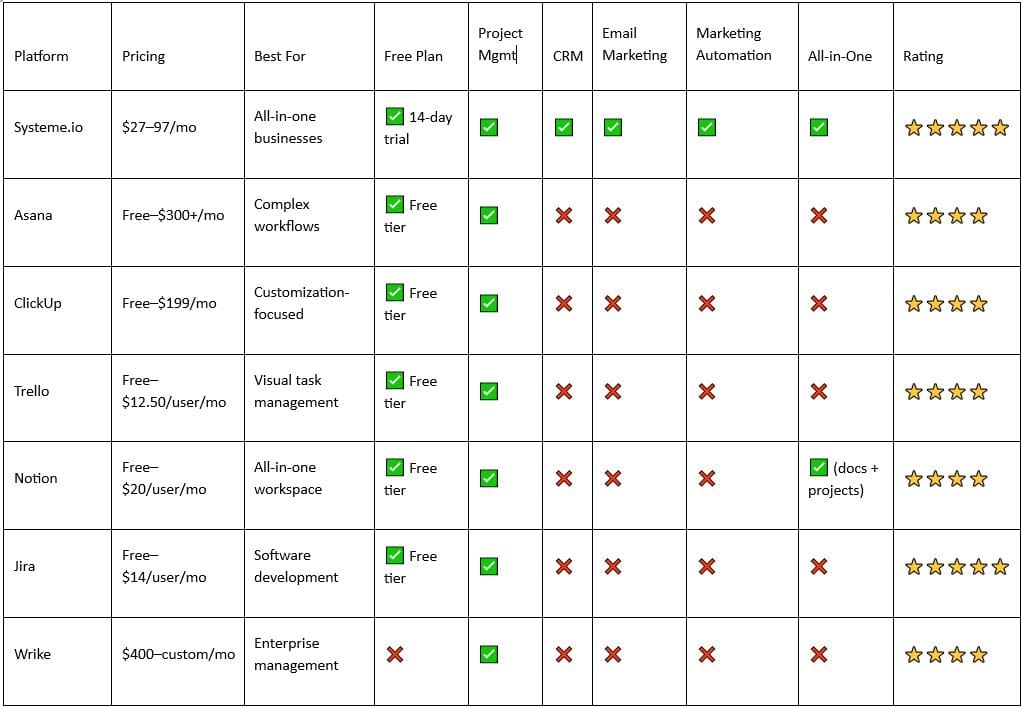
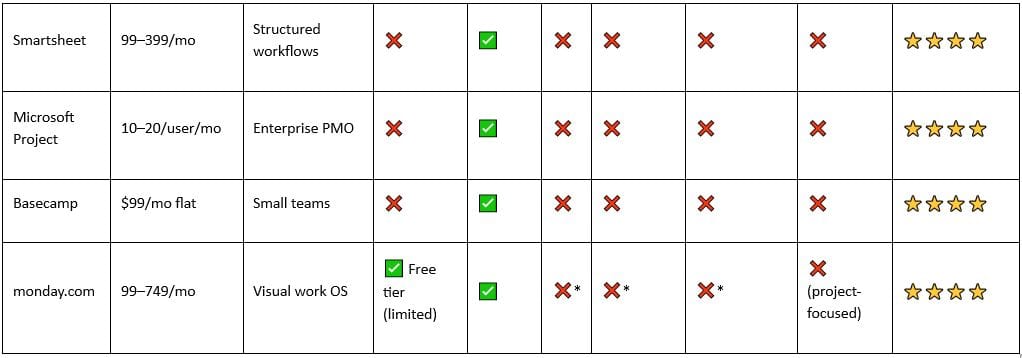
*monday.com requires integrations for CRM, email, and automation—no native support.
Which Alternative Is Right for You?
Choose Systeme.io if you:
Run a business that sells (digital products, courses, services, ecommerce)
Need project management plus CRM, email, funnels, and automation
Are a solopreneur or 1–50 person team
Want the lowest total cost (not just project management cost)
Are tired of subscribing to monday.com plus Pipedrive plus ActiveCampaign plus Zapier
Budget: $27–97/month (everything included)
Choose Asana if you:
Have complex workflows with dependencies across teams
Need portfolio-level project tracking
Have a budget for per-user pricing
Don't need CRM, email, or marketing automation
Budget: 119–300+/month
Choose ClickUp if you:
Want maximum customization and features
Have a technical team that can handle complexity
Need multiple view types (board, timeline, calendar, table)
Want to consolidate project management (but still need other tools)
Budget: Free–$199/month
Choose Trello if you:
Want the simplest possible project management
Use Kanban methodology exclusively
Have a small team (5–15 people)
Don't need advanced scheduling or dependencies
Budget: Free–$12.50/user/month
Choose Notion if you:
Need a workspace combining docs, databases, and light project tracking
Want affordability and flexibility
Prioritize knowledge management
Don't need advanced project features
Budget: Free–$20/user/month
Choose Jira if you:
Are a software development team managing sprints
Need agile methodology built-in
Work with GitHub, GitLab, or Bitbucket
Require advanced developer integrations
Budget: Free–$14/user/month
Choose Wrike if you:
Are a 100+ person enterprise
Need portfolio management across dozens of projects
Require strict governance and approval workflows
Have a large budget for PMO tooling
Budget: $400–custom/month
Choose Smartsheet if you:
Think in spreadsheets, not Kanban
Need form submissions feeding into data grids
Require structured data workflows
Have mid-sized teams (20–100 people)
Budget: 99–399/month
Choose Microsoft Project if you:
Are a Fortune 500 enterprise with PMO
Need Gantt chart mastery
Require Microsoft 365 integration
Manage thousands of projects
Budget:10–20/user/month + enterprise licensing
Choose Basecamp if you:
Are a small team (5–30 people)
Hate per-user pricing and feature complexity
Prioritize communication over advanced features
Want a flat rate that never changes
Budget: $99/month (forever)
Why People Leave monday.com in 2026
The reasons are consistent and predictable:
1. Aggressive pricing scaling — The 99/month starter plan quickly becomes 500–1,000/month as you add users and teams. By comparison, Systeme.io stays at $97/month unlimited.
2. Feature bloat without business value — monday.com is excellent at project management but doesn't help you sell, market, or manage customer relationships. You still need 3–5 other tools.
3. Total cost of ownership shock — monday.com + Pipedrive (CRM) + ActiveCampaign (email) + Stripe (payments) + Zapier (integration) = 400–600/month for a small team. Systeme.io does all of this for 27–97/month.
4. Onboarding and training burden — Implementing monday.com requires 3–6 weeks of setup, training, and custom configuration. Teams want something they can start using immediately.
5. Better alternatives for specific use cases — If you're selling digital products, Systeme.io is objectively better. If you're a small team, Basecamp or Trello is simpler. If you're an enterprise, Asana or Wrike has better features.
6. Hidden integration costs — monday.com's ecosystem requires paid apps and integrations. What you see isn't what you pay.
Frequently Asked Questions
What is the best free alternative to monday.com?
ClickUp has the most generous free plan (unlimited users, basic features). Trello and Asana also offer legitimate free tiers. However, all three require separate tools for CRM, email, and marketing.
Systeme.io offers a 14-day free trial (no credit card required) that includes project management, CRM, email, funnels, and automation—everything you'd need to run a small business.
Why are people leaving monday.com?
Three main reasons:
Cost at scale — Per-user pricing becomes expensive fast ($500–1,000+/month for 10 people)
Lack of all-in-one functionality — Still need separate CRM, email, and funnel tools
Overkill for small teams — The learning curve and complexity don't justify the cost
Is Systeme.io better than monday.com?
It depends on your use case:
For selling products/services? Yes. Systeme.io is objectively better (and cheaper).
For pure project management with 100+ person teams? monday.com might have slight advantages.
For cost? Systeme.io wins dramatically.
For ease of use? Systeme.io wins.
Can I migrate from monday.com to Systeme.io?
Yes. Most monday.com data (tasks, projects, custom fields) can be exported as CSV and imported into Systeme.io. The migration typically takes 2–5 days depending on complexity.
What's the cheapest monday.com alternative?
Basecamp at $99/month flat is cheap if you need team communication. Trello Free is free but limited. ClickUp Free is the most feature-rich free option.
However, for a complete business platform (projects + CRM + email + automation), Systeme.io at $27/month is unbeatable.
Is there a better alternative to monday.com for small teams?
Yes, depending on your needs:
Simplicity? Basecamp ($99/month flat, unlimited users)
Features + low cost? ClickUp (Free–$199/month)
All-in-one business? Systeme.io ($27–97/month)
Kanban simplicity? Trello (Free–$12.50/user/month)
What's the best monday.com alternative for agencies?
Systeme.io if you're selling services/courses/digital products. If you're managing client projects only, Asana, ClickUp, or Wrike are better at pure project management.
Conclusion: Make the Switch
If you're still on monday.com in 2026, you're likely overpaying and under-utilizing.
monday.com is an excellent project management tool. But project management alone doesn't grow businesses. Revenue grows businesses. And revenue comes from selling, marketing, and customer relationships—none of which monday.com handles well.
The platform shift is clear: teams want integrated business operating systems, not point solutions.
Systeme.io is that system. It handles projects plus the functions that actually drive revenue: CRM, email marketing, sales funnels, ecommerce, automation, and courses—all at a price that makes sense ($27–97/month, unlimited everything).
You'll save 80–90% on software costs. Your team will be productive in days, not weeks. And you'll actually own your entire customer journey instead of duct-taping five tools together.
Ready to make the switch?
Systeme.io gives you everything monday.com does (project management) plus the business functions it's missing (CRM, marketing, sales, automation). At a fraction of the cost.
Start Your Free 14-Day Trial Today →
No credit card required. Full access to projects, CRM, email, funnels, courses, and more. See why 100,000+ entrepreneurs choose Systeme.io to run their entire business.
This post contains affiliate recommendations and links. I only promote products and services I personally use, trust, and believe will genuinely benefit my audience. If you purchase through my links, I may earn a commission at no extra cost to you. This compensation helps support my work and allows me to continue providing valuable content. Thank you for your support and trust.
Leave a reply
Copyright © 2022 SuePats.com - nuBeginning.com | All Rights Reserved | PRIVACY POLICY - TERMS & CONDITIONS - DISCLAIMER