
10 Best Salesforce Alternatives in 2026: Find Your Perfect All-in-One Platform
Introduction: Why You're Looking for a Salesforce Alternative
Salesforce is powerful. But it's also expensive, complicated, and often feels like overkill for growing businesses that need simplicity without sacrificing functionality.
You're not alone. Thousands of companies are ditching Salesforce every year because:
Pricing feels bloated — $165/month per user adds up fast, especially when you're not using half the features
Implementation is a nightmare — It takes months to set up properly and requires expensive consultants
Complexity hides simplicity — You need training to do basic tasks that should take minutes
Hidden costs mount — Add-ons, integrations, and customizations turn your initial quote into a budget killer
The good news? The all-in-one platform landscape has evolved dramatically. Today's alternatives combine CRM, marketing automation, email, funnels, and more — without the enterprise bloat or the enterprise price tag.
In this guide, we've identified the 10 best Salesforce alternatives in 2026, including:
✅ Best overall all-in-one replacement
✅ Best for sales teams on a budget
✅ Best for agencies and service providers
✅ Best free and open-source options
✅ Best for enterprise-scale operations
✅ Best for simplicity and ease of use
✅ Best specialized alternatives for specific use cases
Let's get straight to it.
Quick-Scan List: All 10 Alternatives at a Glance
Systeme.io — Best overall Salesforce alternative
HubSpot — Best for small-to-mid-market sales teams
GoHighLevel — Best for agencies and service providers
Pipedrive — Best for sales-first simplicity
Keap (Infusionsoft) — Best for small business automation
ActiveCampaign — Best for marketing automation depth
Monday.com — Best for visual pipeline management
Zoho CRM — Best affordable enterprise alternative
Klaviyo — Best for ecommerce businesses
Odoo — Best open-source customization
Alternative #1: Systeme.io — Best Overall Salesforce Alternative
Why Systeme.io Wins vs. Salesforce
If you're tired of paying Salesforce prices for features you don't need, Systeme.io is the game-changer you've been searching for.
Systeme.io is a true all-in-one business platform that combines everything Salesforce does — CRM, sales automation, email marketing, landing pages, funnels, and customer management — into one unified system. Except it's:
70% cheaper — Starting at just 27/monthvs.Salesforce′s 165+/month
Faster to implement — Set up your entire system in days, not months
Easier to use — No training required; intuitive interface anyone can learn in minutes
Built for growing businesses — Not designed for enterprise sprawl; designed for businesses that actually need to move fast
Who it's for: Coaches, course creators, small agencies, ecommerce sellers, SaaS founders, and service providers who need a complete business system without the Salesforce complexity.
Core Features & Benefits
✅ CRM + Sales Pipeline — Track leads, manage deals, and automate follow-ups without leaving the platform
✅ Email Marketing & Automation — Build sequences, segment audiences, and nurture leads automatically (no need for separate tools like ConvertKit or MailerLite)
✅ Landing Pages & Sales Funnels — Create high-converting pages and funnels without hiring a developer (competes with ClickFunnels at 1/3 the price)
✅ Membership & Course Hosting — Deliver digital products, courses, and memberships directly in Systeme.io (no need for Teachable or Kajabi)
✅ Payment Processing — Integrated Stripe/PayPal processing; collect payments without leaving the system
✅ Complete Automation — Trigger-based workflows that handle repetitive tasks — email sequences, lead scoring, deal progression
✅ Full Customer Database — Centralized contact management, custom fields, segmentation, and notes — everything a proper CRM should do
Pricing Breakdown
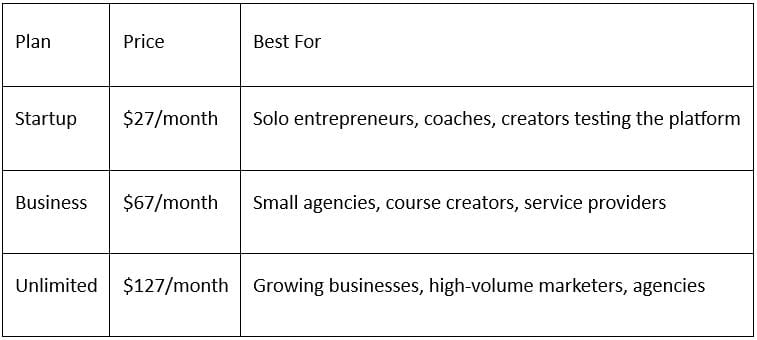
All plans include: Unlimited contacts, landing pages, automations, courses, memberships, and email sends. No per-contact fees. No hidden costs.
Why It Beats Salesforce
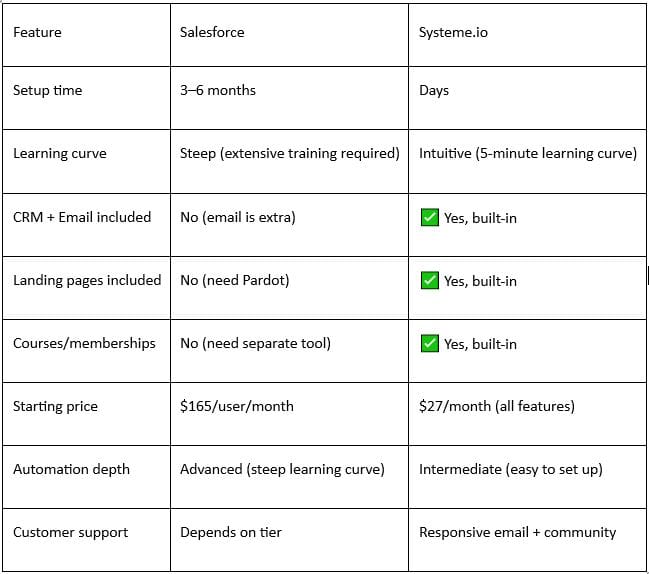
Bottom line: Systeme.io does 80% of what Salesforce does for businesses like yours — at 1/6th the cost and 10x the ease.
Start Your Free Trial of Systeme.io Today →
No credit card required. Full access to all features for 14 days.
Alternative #2: HubSpot — Best for Small-to-Mid-Market Sales Teams
Overview
HubSpot's free CRM is the reason it's the default choice for growing sales teams. It's transparent, beginner-friendly, and powerful enough to scale.
Strengths
Generous free tier — Unlimited contacts, basic CRM, email, and limited automations at no cost
Excellent documentation — The best onboarding experience in the industry; learning curve is shallow
Sales-focused — Pipeline management, deal tracking, and sales sequence tools are top-notch
Ecosystem — Integrates with hundreds of apps; works well with existing tools
Reputation — Trusted by over 220,000 companies; strong community and resources
Weaknesses
Pricing jumps quickly — Free tier is limited; paid plans start at
50/monthandscaleto
50/monthandscaleto3,200+/month
Limited landing pages — No built-in funnel builder; you'll need Leadpages or Unbounce
Email marketing is basic — Automation works, but it's not as powerful as dedicated tools
No course hosting — If you sell digital products, you'll need a separate platform
Paid plans feel expensive for what you get once you hit limits
Pricing
Free: Unlimited contacts, basic CRM, limited workflows
Starter: $50/month (up to 1,000 contacts)
Professional: $800/month (up to 10,000 contacts, advanced workflows)
Enterprise: Custom pricing
When to Choose HubSpot
HubSpot wins if you're building a sales-first business with a small team that values simplicity and best-in-class onboarding. The free tier is genuinely useful for solo founders and early-stage startups.
Alternative #3: GoHighLevel — Best for Agencies and Service Providers
Overview
GoHighLevel is the Salesforce replacement built specifically for agencies. It combines CRM, funnel builder, scheduling, SMS, and more into one agency-focused platform.
Strengths
Built for agencies — White-label features let you resell to clients as your own
Complete platform — SMS, email, funnels, forms, calendars, and CRM all included
Affordable — Starting at
99/month(or
99/month(or297/month for full features)
Client management — Perfect for managing multiple client accounts and workflows
Integrations — Works with Zapier, Stripe, and 500+ tools
Marketing automation — Solid workflows and sequences without extra costs
Weaknesses
Complexity — Despite being "all-in-one," the interface feels cramped and overwhelming at first
Course hosting is weak — Not ideal for selling digital products (Systeme.io does this better)
SMS costs extra — SMS credits beyond the base plan get expensive
Customer support — Helpful, but response times vary
Not ideal for solopreneurs — Priced for agencies managing multiple clients
Pricing
Standard: $99/month (1 client, limited features)
Pro: $297/month (unlimited clients, all features)
Agency: Custom pricing (for teams)
When to Choose GoHighLevel
GoHighLevel is perfect if you're an agency or service provider managing multiple client accounts. White-label reselling and client sub-accounts are built-in, making it the easiest way to scale agency services.
Alternative #4: Pipedrive — Best for Sales-First Simplicity
Overview
Pipedrive obsesses over sales pipeline management. If your primary need is visual deal tracking and sales automation (not marketing or courses), Pipedrive is unbeatable in its simplicity.
Strengths
Visual pipeline — Kanban-style pipeline view is intuitive and satisfying
Sales-focused — Every feature is built around closing deals, not marketing
Affordable — Starting at $14/month makes it one of the cheapest CRM options
Fast implementation — Set up and selling in hours, not weeks
Mobile app — Excellent mobile experience for sales teams on the go
Integrations — Works with email, Slack, Zapier, and 400+ tools
Weaknesses
Limited email automation — Not designed for complex marketing sequences
No landing pages — You'll need a separate tool for funnels
Basic reporting — Advanced analytics require custom integrations
No course/membership hosting — Single-purpose sales tool
Customer support — Helpful, but not as extensive as HubSpot
Pricing
Essential: $14/month (basic CRM, 1 user)
Advanced: $39/month (automation, multiple users)
Professional: $69/month (advanced workflows, team tools)
Enterprise: Custom pricing
When to Choose Pipedrive
Choose Pipedrive if your business is 100% sales-focused and you want the simplest, most affordable pipeline management tool on the market. It's not an all-in-one platform, but what it does, it does brilliantly.
Alternative #5: Keap (Infusionsoft) — Best for Small Business Automation
Overview
Keap (formerly Infusionsoft) is a powerful automation and CRM platform that's been around for 15+ years. It's built for small businesses that need deep automation without Salesforce complexity.
Strengths
Deep automation — Complex workflows and conditional logic rival Salesforce
All-in-one — CRM, email, landing pages, and SMS in one platform
Long history — Proven track record; trusted by thousands of small businesses
Customer support — Responsive and knowledgeable support team
Integrations — Works with 500+ apps including Stripe, Zapier, and Facebook Ads
Compliance tools — GDPR and data privacy features built-in
Weaknesses
Pricing is high — Starting at $99/month, it's expensive for early-stage businesses
Learning curve — Automation is powerful but complex; requires training
Outdated interface — UI feels dated compared to modern alternatives (Systeme.io, HubSpot)
Setup takes time — Like Salesforce, proper implementation requires expertise
Limited course hosting — Better for service businesses than course creators
Pricing
Essentials: $99/month (basic CRM, limited automation)
Plus: $199/month (advanced automation, 2 users)
Professional: $349/month (unlimited users, advanced features)
When to Choose Keap
Keap is ideal for service-based small businesses (coaches, consultants, contractors) who need powerful automation but can't afford Salesforce complexity or price. If you've been using Infusionsoft for years, Keap is the natural upgrade.
Alternative #6: ActiveCampaign — Best for Marketing Automation Depth
Overview
ActiveCampaign is the marketing automation powerhouse — if you need advanced email sequences, multi-channel campaigns, and deep automation without bloat, this is it.
Strengths
Best-in-class automation — Conditional logic, branching, and triggers rival Salesforce
Email marketing — Beautifully designed templates and advanced segmentation
CRM included — Solid contact and deal management (not as advanced as Salesforce, but solid)
Multi-channel — Email, SMS, webhooks, and integrations in one platform
Affordable scaling — Pricing based on contacts, not per-user
Integrations — 1,000+ app connections via Zapier and native integrations
Weaknesses
Not truly all-in-one — No landing page builder, no course hosting
Learning curve — Advanced automation features are powerful but complex
Interface is dense — Too many features packed into the UI
Pricing scales with contacts — Can get expensive as you grow your list
Customer support — Helpful but slower response times
Pricing
Lite: $9/month (250 contacts, basic CRM)
Plus: $49/month (10,000 contacts, advanced automation)
Professional: $229/month (100,000 contacts, A/B testing)
Enterprise: Custom pricing
When to Choose ActiveCampaign
Choose ActiveCampaign if email marketing automation is your primary need and you're willing to integrate other tools for landing pages and course hosting. It's the best tool in its category.
Alternative #7: Monday.com — Best for Visual Pipeline Management
Overview
Monday.com is a work OS platform that's gained traction with sales teams who want visual pipeline management and team collaboration in one place.
Strengths
Beautiful interface — Drag-and-drop boards are intuitive and visually appealing
Team collaboration — Built-in comments, assignments, and team communication
Flexibility — Highly customizable workflows for different use cases
Integration hub — Connects to 500+ apps via automation
Mobile app — Solid mobile experience for remote teams
Affordable for teams — Transparent pricing based on users, not contacts
Weaknesses
Not a true CRM — Pipeline management is visual, but automation and reporting lack CRM depth
No email built-in — You'll need to integrate a separate email tool
No landing pages — Not suitable for funnel building
Pricing adds up — Per-user pricing means costs grow with team size
Overkill for solo founders — Best suited for teams, not solopreneurs
Pricing
Basic: $10/month per user (limited automation)
Standard: $20/month per user (advanced automation)
Pro: $40/month per user (custom fields, reporting)
Enterprise: Custom pricing
When to Choose Monday.com
Choose Monday.com if you have a sales team (3+ people) and want visual pipeline management plus team collaboration. It's excellent for managing internal workflows, not suitable as a complete Salesforce replacement.
Alternative #8: Zoho CRM — Best Affordable Enterprise Alternative
Overview
Zoho CRM is the open-source answer to Salesforce. It's powerful, affordable, and designed for businesses that want enterprise features without enterprise pricing.
Strengths
Powerful automation — Workflow automation, custom fields, and scripting rival Salesforce
Incredibly affordable — Starting at $18/month makes it one of the cheapest powerful CRMs
Zoho ecosystem — Integrates seamlessly with 50+ other Zoho tools (email, accounting, etc.)
Deep customization — Custom modules, fields, and workflows let you build exactly what you need
Strong reporting — Advanced analytics and dashboards included
Multi-language support — Used globally; excellent localization
Weaknesses
Learning curve — Powerful, but takes time to master
Interface feels dated — Not as modern as HubSpot or Systeme.io
Limited landing pages — You'll need a separate tool for funnels
No course hosting — Better for service businesses than creators
Customer support — Help is available, but response times are slower
Pricing
Free: Up to 3 users, limited features
Standard: $18/month (unlimited users, all features)
Professional: $45/month (advanced customization)
Enterprise: $85/month (custom development)
When to Choose Zoho CRM
Choose Zoho CRM if you want enterprise-level power at SMB prices and don't mind spending time mastering a complex platform. It's the best alternative for businesses that have outgrown HubSpot but can't justify Salesforce costs.
Alternative #9: Klaviyo — Best for Ecommerce Businesses
Overview
Klaviyo is the ecommerce marketing automation platform built specifically for online sellers. If you're running a Shopify store, Klaviyo is often a better fit than Salesforce.
Strengths
Built for ecommerce — SMS, email, and integrations are all designed for online sellers
Shopify integration — Native integration captures product data, purchase history, and customer behavior
Powerful segmentation — Segment customers by purchase behavior, product category, and engagement
SMS marketing — SMS campaigns are integrated, not tacked on
Analytics — ROI tracking for email and SMS campaigns included
Growing platform — Constantly adding new features and integrations
Weaknesses
Not a CRM — No deal management or sales pipeline features
Pricing scales with contacts — Can get expensive as your customer list grows
Limited automation for services — Built for product sellers, not service providers
No course hosting — Not suitable for digital product creators
Customer support — Helpful, but can be slow during peak times
Pricing
Free: Up to 500 contacts, limited features
Standard: $20/month (10,000 contacts, SMS, basic automation)
Pro: $1,200+/month (100,000+ contacts, advanced features)
When to Choose Klaviyo
Choose Klaviyo if you're an ecommerce business selling physical or digital products and want email + SMS marketing integrated with your Shopify store. It's the best platform for ecommerce marketing automation.
Alternative #10: Odoo — Best Open-Source Customization
Overview
Odoo is an open-source ERP (Enterprise Resource Planning) platform that includes CRM, email, sales automation, and much more. It's the ultimate customization option.
Strengths
Open-source — Full control over code; customize anything
Complete system — CRM, accounting, inventory, HR, manufacturing all in one
Affordable — Self-hosted version is free; cloud plans start at $1,890/year
Scalable — Grows with you from startup to enterprise
Community support — Active developer community for customization
No vendor lock-in — Own your data and code
Weaknesses
Steep learning curve — Requires technical expertise to set up and customize
Implementation takes time — Not a 1-day setup; plan for weeks/months
Support varies — Community support is free but inconsistent
Requires developer — You'll likely need a developer to maintain it
Not beginner-friendly — Definitely not for non-technical founders
Pricing
Free (self-hosted): Open-source version
Odoo Cloud:1,890–4,800/year per company (3–30+ users)
Custom deployment: Consulting required
When to Choose Odoo
Choose Odoo if you're a technical founder or have developer resources and want complete customization and control over your business system. It's the only true open-source alternative to Salesforce.
Comparison Table: All 10 Alternatives at a Glance
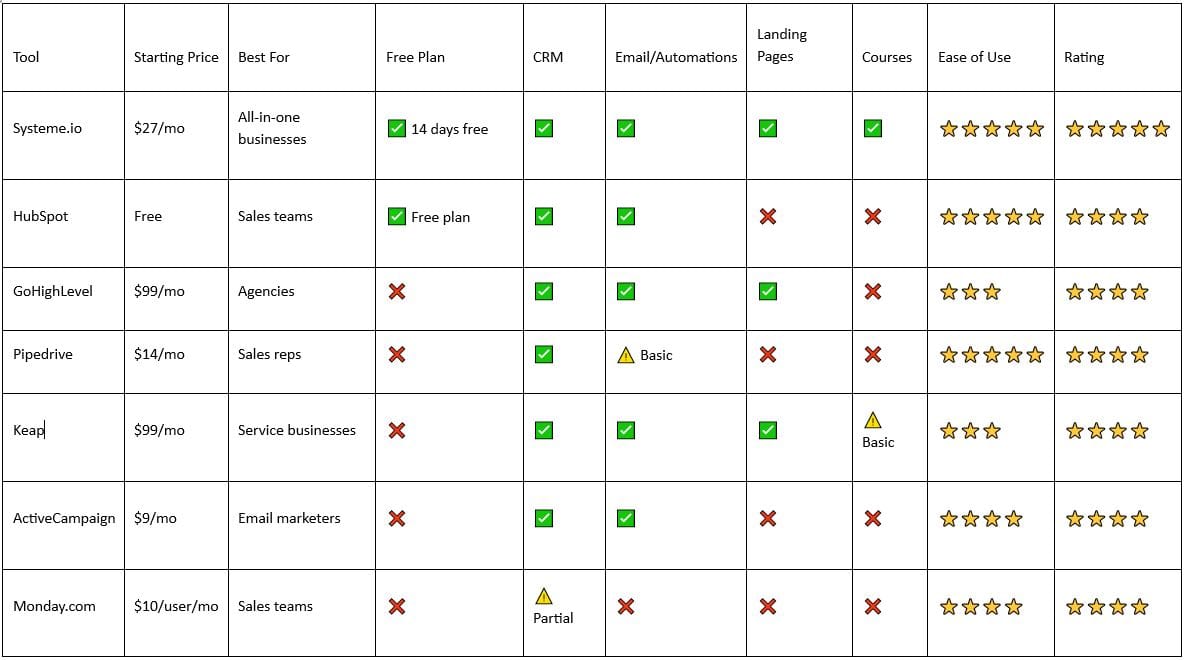
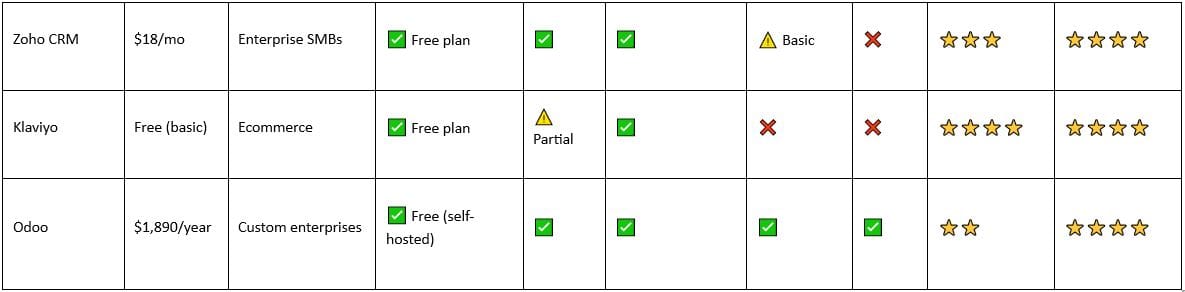
Which Alternative Is Right for You?
"If you need everything in one platform..."
→ Go with Systeme.io. It's the only true all-in-one that includes CRM, email, landing pages, courses, and funnels. Perfect for coaches, creators, and small agencies that don't want to juggle 5 different tools.
"If you're a solo founder on a tight budget..."
→ Start with HubSpot's free tier or Pipedrive at $14/month. Both are powerful enough to start, and you can upgrade as you grow. Skip Salesforce entirely.
"If you're an agency managing multiple clients..."
→ Go with GoHighLevel. White-label features and client sub-accounts are built-in. It's designed for exactly what you're doing.
"If you're purely focused on sales..."
→ Choose Pipedrive. It does one thing (sales pipeline management) better than anyone else. Simple, visual, affordable.
"If you're an ecommerce business..."
→ Use Klaviyo for email/SMS + your Shopify store. Don't overthink it; Klaviyo is built for exactly your use case.
"If you're a service provider who wants deep automation..."
→ Pick Keap or ActiveCampaign. Both offer powerful automation that rivals Salesforce, without the bloat or price tag.
"If you need true open-source customization..."
→ Deploy Odoo. But only if you have a developer on your team. It's not for beginners.
"If you want visual team collaboration + pipeline..."
→ Use Monday.com (for teams 3+) or HubSpot (for solo/small sales teams).
Why You Should Switch From Salesforce in 2026
Let's be honest: Salesforce is not failing. It's an excellent CRM — if you have the budget, the implementation team, and the need for enterprise complexity.
But for growing businesses, Salesforce has become the default everyone buys but nobody actually wants.
Here's why now is the time to switch:
1. The all-in-one alternative matured. Platforms like Systeme.io now offer 80% of Salesforce's features at 1/6th the cost. The gap has closed.
2. Your team won't use Salesforce. Most Salesforce implementations fail because they're too complex for the people using them. Simpler tools = more adoption.
3. You're paying for features you don't use. Salesforce pricing includes features built for enterprise sales operations. If you're not a 500-person enterprise, you're overpaying.
4. Implementation costs add up. Salesforce's true cost isn't the monthly fee — it's the $50K+ in consultant fees to make it actually work.
5. AI-powered competitors are getting smarter. Newer platforms like Systeme.io are building AI into their core features (not as add-ons). They're catching up fast.
Final CTA: Make the Switch Today
Ready to ditch Salesforce?
If you've read this far, you already know Salesforce isn't the right fit. The question is: which alternative is right for your business?
Start with this simple framework:
1. Do you need email, landing pages, and courses in one platform? → Try Systeme.io free for 14 days
2. Do you just need a simple sales CRM? → Start with HubSpot's free tier
3. Are you an agency? → Test GoHighLevel for 14 days
4. Are you 100% ecommerce? → Try Klaviyo's free plan
Don't stay in Salesforce out of inertia. You switched to Salesforce for a reason years ago. Market conditions have changed.
Your business has changed. Your tools should change too.
14-day free trial. All features included. No credit card required.
FAQ: Common Questions About Salesforce Alternatives
What is the best free alternative to Salesforce?
HubSpot's free CRM is genuinely useful for small teams and solopreneurs. You get unlimited contacts, basic automation, and deal management. If you also need landing pages and courses, Systeme.io's 14-day free trial gives you full access to everything.
Why are companies leaving Salesforce?
Three main reasons: (1) Cost — $165+/user/month adds up, (2) Complexity — Implementation and training take forever, (3) Over-engineering — Most businesses use 20% of Salesforce's features.
Is Systeme.io really better than Salesforce?
For most growing businesses? Yes. Systeme.io includes everything you actually need (CRM, email, landing pages, courses, automation) at 1/6th the cost. If you're a 500-person enterprise running complex sales operations, Salesforce is still better. Everyone else should switch.
Can I migrate from Salesforce to [Alternative]?
Yes. Most platforms (HubSpot, Systeme.io, Zoho) offer migration assistance. Contact their support team to discuss your data export and import timeline.
Which Salesforce alternative is easiest to implement?
Systeme.io and HubSpot are the fastest to set up (hours to days). Keap and Zoho take weeks. Odoo takes months if you need customization.
Do I need to hire a consultant to migrate from Salesforce?
For simpler platforms (HubSpot, Systeme.io, Pipedrive)? No. You can do it yourself. For complex alternatives (Odoo, enterprise Zoho)? Yes, a consultant can save you time and mistakes.
This post contains affiliate recommendations and links. I only promote products and services I personally use, trust, and believe will genuinely benefit my audience. If you purchase through my links, I may earn a commission at no extra cost to you. This compensation helps support my work and allows me to continue providing valuable content. Thank you for your support and trust.
Leave a reply
Copyright © 2022 SuePats.com - nuBeginning.com | All Rights Reserved | PRIVACY POLICY - TERMS & CONDITIONS - DISCLAIMER