
10 Best Pipedrive Alternatives in 2026: Beyond Simple Sales Pipeline Management
Introduction: Why You're Outgrowing Pipedrive
Pipedrive is great at one thing: making sales pipeline management beautifully simple.
But here's the problem — your business needs more than just a beautiful pipeline.
If you're managing a growing business in 2026, you're probably juggling Pipedrive plus:
Separate email marketing tool (ConvertKit, MailerLite, ActiveCampaign)
Landing page builder (Leadpages, Unbounce, or ClickFunnels)
Course platform (Teachable, Kajabi, or Podia)
Invoicing software (Wave, FreshBooks, or Stripe)
Customer support system (Zendesk, Intercom, or Help Scout)
That's 6+ different tools. 6+ different logins. 6+ different integrations.
Pipedrive wasn't built for this. It's a single-purpose sales CRM — which means:
❌ Limited automation — Basic workflows, but nothing compared to true marketing automation platforms
❌ No landing pages or funnels — You need a separate builder
❌ No email marketing — Pipedrive's email is bare-bones; you'll want dedicated tools
❌ No course hosting — If you sell digital products, you're stuck integrating
❌ No membership management — Can't create subscriber-only content directly in Pipedrive
❌ Growing costs — Adding integrations and extensions adds up fast
The real issue? As your business scales, Pipedrive becomes a bottleneck. You need a true all-in-one platform that handles sales, marketing, courses, and automation — all in one place.
That's what this guide is about.
We've identified the 10 best Pipedrive alternatives in 2026, with a focus on platforms that go beyond simple sales pipeline management:
✅ Best all-in-one replacement (with email, funnels, and courses)
✅ Best for advanced sales automation
✅ Best for agencies and service providers
✅ Best affordable enterprise alternatives
✅ Best for course creators and digital product sellers
✅ Best for ecommerce and product-based businesses
✅ Best free and freemium options
✅ Best for team collaboration and visibility
Let's dive in.
Quick-Scan List: All 10 Alternatives at a Glance
Systeme.io — Best all-in-one Pipedrive alternative
HubSpot — Best for small sales teams with advanced automation
Salesforce — Best for enterprise sales operations
Keap (Infusionsoft) — Best for service businesses and automation depth
GoHighLevel — Best for agencies managing multiple clients
ActiveCampaign — Best for email automation + CRM combo
Monday.com — Best for visual pipeline + team collaboration
Kajabi — Best for course creators and digital product sellers
Zoho CRM — Best affordable enterprise-grade alternative
Ontraport — Best for complex multi-channel automation
Alternative #1: Systeme.io — Best All-in-One Pipedrive Alternative
Why Systeme.io Wins vs. Pipedrive
The biggest difference? Systeme.io is what Pipedrive should have been — a complete business platform that handles sales, marketing, courses, and automation all in one place.
Pipedrive made you fall in love with a beautiful sales pipeline. Systeme.io makes you fall in love with a business that actually runs itself.
Who It's For
Systeme.io is perfect for coaches, course creators, small agencies, SaaS founders, and service providers who've outgrown Pipedrive and are tired of juggling multiple tools. If you're using Pipedrive + 4 other tools, Systeme.io consolidates everything into one unified system.
Core Features & Benefits
✅ Sales Pipeline Management — Everything Pipedrive has (deal tracking, visual pipeline, automation) but with WAY more power behind it
✅ Email Marketing & Automation — Full-featured email builder, segmentation, and automation sequences (no need for ConvertKit or MailerLite)
✅ Landing Pages & Sales Funnels — High-converting templates and funnel builder (replaces ClickFunnels, Leadpages, or Unbounce)
✅ Course & Membership Hosting — Deliver digital products, drip-feed content, and manage memberships directly in the platform (no Teachable or Kajabi needed)
✅ Advanced Automation — Trigger-based workflows with conditional logic that rival platforms 10x the price
✅ Payment Processing — Integrated Stripe and PayPal; collect payments without redirects
✅ Customer Database — Unlimited contacts, custom fields, tagging, segmentation — true CRM functionality
✅ Built-in Affiliate System — Track referrals and commissions without third-party tools
Pricing Breakdown
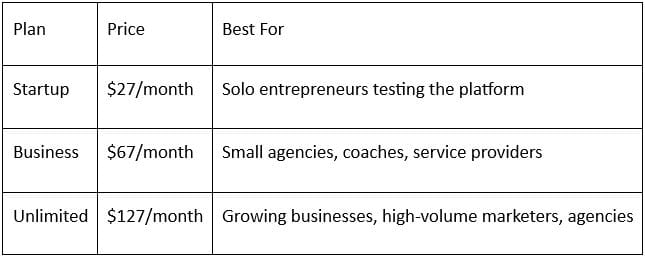
What you get at every tier:
Unlimited contacts
Unlimited landing pages
Unlimited automations
Unlimited course hosting
Unlimited email sends
All features included (no paywalls)
Why It Beats Pipedrive Specifically
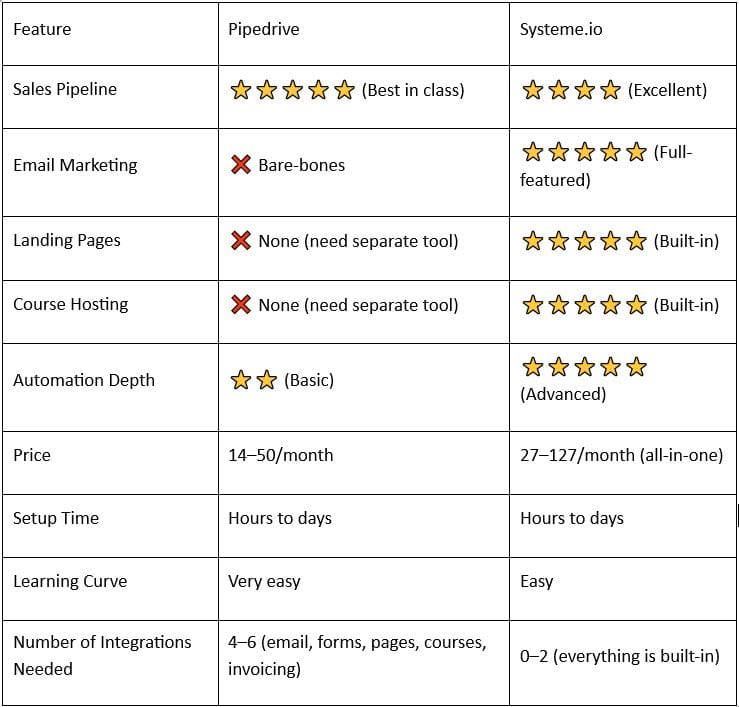
The Real Cost Comparison
With Pipedrive, you're paying:
Pipedrive: 14–50/month
Email tool (ConvertKit/MailerLite): 30–100/month
Landing page builder (Leadpages/Unbounce): 25–99/month
Course platform (Teachable/Podia): 39–99/month
Total: 108–348/month
With Systeme.io, you're paying:
Systeme.io: 27–127/month (everything included)
Total: 27–127/month
CTA Button
Start Your Free 14-Day Trial of Systeme.io →
Full access to all features. No credit card required.
Alternative #2: HubSpot — Best for Advanced Sales Teams
Overview
HubSpot is the sales automation powerhouse for teams that want more sophistication than Pipedrive but less complexity than Salesforce.
Strengths
✅ Advanced sales automation — Sequences, workflows, and conditional logic that rival enterprise CRMs
✅ Built-in email tools — Decent email marketing and automation (though not as powerful as dedicated tools)
✅ Excellent free tier — Unlimited contacts and basic CRM in the free plan
✅ Best-in-class onboarding — Learning curve is shallow; most teams get productive in days
✅ 500+ integrations — Plays well with other tools; easier to build a tech stack
✅ Team collaboration — Excellent for teams managing accounts together
Weaknesses
❌ Limited landing pages — Basic forms, but no true landing page builder (need Leadpages or Unbounce)
❌ No course hosting — Can't deliver digital products directly in HubSpot
❌ Email marketing is okay, not great — Fine for automation, but not as sophisticated as dedicated tools
❌ Pricing scales quickly — Free tier is limited; paid plans start at 50/month and jump to 3,200+
❌ Doesn't replace email tools — You'll still want ConvertKit or ActiveCampaign for serious email marketing
Pricing
Free: Unlimited contacts, basic CRM, limited workflows
Starter: $50/month (basic automation, 1,000 contact limit)
Professional: $800/month (advanced workflows, 10,000 contacts)
Enterprise: $3,200+/month (custom development, unlimited contacts)
When to Choose HubSpot
Choose HubSpot if you're a sales-focused team that values automation and intends to integrate it with other best-in-class tools (like Klaviyo for email, or Leadpages for landing pages). It's more powerful than Pipedrive but requires a bigger budget.
Alternative #3: Salesforce — Best for Enterprise Sales Operations
Overview
Salesforce is the enterprise sales CRM — if your team is 20+ people managing complex deals, Salesforce does it better than anyone.
Strengths
✅ Ultimate customization — Configure virtually anything; bends to your process
✅ Advanced automation — Flow builder, process builder, and Apex scripting for complex workflows
✅ Einstein AI — Predictive sales forecasting and lead scoring built-in
✅ Massive ecosystem — 10,000+ integrations and AppExchange apps
✅ Enterprise security — Bank-level encryption, compliance (HIPAA, GDPR), audit trails
✅ Best for large teams — Designed to scale across 100+ users seamlessly
Weaknesses
❌ Incredibly expensive — $165/user/month minimum; costs skyrocket with users
❌ Implementation nightmare — Takes 3–6 months to set up properly; requires consultants
❌ Overkill for most businesses — 95% of features go unused by typical companies
❌ Steep learning curve — Your team will need training to use it effectively
❌ No built-in email or courses — You'll need add-ons (Pardot, Talentlms) which add more cost
Pricing
Essentials: $165/user/month
Professional: $330/user/month
Enterprise: $660/user/month
Unlimited: $1,320/user/month (custom development)
When to Choose Salesforce
Only if you're an enterprise with 50+ sales reps managing complex, multi-stage deals. Everyone else is overpaying.
Alternative #4: Keap (Infusionsoft) — Best for Service Businesses & Automation Depth
Overview
Keap is the service business powerhouse — it combines CRM, email marketing, and advanced automation in one platform (very similar to Systeme.io, but older and more enterprise-focused).
Strengths
✅ Deep automation — Conditional workflows and complex logic rival Salesforce
✅ All-in-one approach — CRM, email, landing pages, and SMS included
✅ Built for service businesses — Perfect for coaches, consultants, contractors
✅ 15+ year track record — Proven platform with thousands of loyal users
✅ Responsive support — Good customer service team
✅ Compliance tools — GDPR and data privacy built-in
Weaknesses
❌ Pricing is high — Starting at 99/month, jumps to 349+/month quickly
❌ Outdated interface — Feels dated compared to modern platforms (Systeme.io, HubSpot)
❌ Learning curve — Automation is powerful but complex; requires training
❌ Setup takes time — Like Salesforce, proper implementation requires expertise
❌ Limited course hosting — Better for services than digital product creators
Pricing
Essentials: $99/month (basic CRM, limited automation, 1 user)
Plus: $199/month (advanced automation, 2 users)
Professional: $349/month (unlimited users, advanced features)
When to Choose Keap
Choose Keap if you're a service provider (coach, consultant, contractor) who wants automation depth and has been on Infusionsoft for years. For new businesses, Systeme.io is simpler and cheaper.
Alternative #5: GoHighLevel — Best for Agencies
Overview
GoHighLevel is the agency powerhouse — built specifically for marketing agencies managing multiple client accounts.
Strengths
✅ White-label features — Rebrand and resell to clients as your own platform
✅ Client sub-accounts — Manage multiple client accounts from one dashboard
✅ All-in-one — CRM, funnels, email, SMS, forms, calendars all included
✅ Affordable for agencies — 99–297/month works for managing 5–50 clients
✅ SMS marketing — Integrated SMS campaigns (not tacked on)
✅ 500+ integrations — Zapier and native connections to tools you already use
Weaknesses
❌ Complex interface — Despite being "all-in-one," it feels cramped and overwhelming
❌ Course hosting is weak — Not ideal for selling digital products
❌ SMS credits cost extra — Beyond included limit, SMS gets expensive
❌ Customer support varies — Helpful, but response times are inconsistent
❌ Not ideal for solopreneurs — Priced and designed for agencies, not solo businesses
Pricing
Standard: $99/month (1 client, limited features)
Pro: $297/month (unlimited clients, all features)
Agency: Custom pricing (for resellers)
When to Choose GoHighLevel
Choose GoHighLevel if you're a marketing agency managing 3+ client accounts. White-label reselling and client sub-accounts are built-in, making it the easiest way to scale agency services.
Alternative #6: ActiveCampaign — Best for Email Automation + CRM Combo
Overview
ActiveCampaign is the marketing automation + CRM hybrid — if you need advanced email sequences plus sales CRM, this is the sweet spot.
Strengths
✅ Best-in-class automation — Conditional logic, branching, and triggers rival Salesforce
✅ Powerful email marketing — Beautifully designed templates and advanced segmentation
✅ CRM included — Contact management and deal tracking built-in
✅ Multi-channel — Email, SMS, webhooks, and integrations in one platform
✅ Scales with contacts — Pricing based on list size, not per-user (cheaper as you grow)
✅ 1,000+ integrations — Works with virtually any tool you use
Weaknesses
❌ Not truly all-in-one — No landing page builder, no course hosting
❌ Learning curve — Advanced automation features are powerful but complex
❌ Interface is dense — Too many features packed into the UI; feels cluttered
❌ Pricing scales — Becomes expensive as your contact list grows (10,000+ contacts)
❌ Customer support — Helpful but slower response times
Pricing
Lite: $9/month (250 contacts, basic CRM)
Plus: $49/month (10,000 contacts, advanced automation)
Professional: $229/month (100,000 contacts, A/B testing)
Enterprise: Custom pricing
When to Choose ActiveCampaign
Choose ActiveCampaign if email marketing automation is your primary need and you're willing to integrate other tools for landing pages and course hosting. It's the best pure automation platform.
Alternative #7: Monday.com — Best for Visual Pipeline + Team Collaboration
Overview
Monday.com is the work OS that sales teams love — if you want Pipedrive's visual pipeline plus team collaboration and custom workflows, this is it.
Strengths
✅ Beautiful interface — Drag-and-drop boards are intuitive and visually appealing
✅ Team collaboration — Built-in comments, assignments, and team communication
✅ Highly customizable — Workflows adapt to any process (sales, support, ops)
✅ 500+ integrations — Connects to Slack, Zapier, and hundreds of tools
✅ Excellent mobile app — Remote teams can manage pipelines on the go
✅ Transparent pricing — Per-user pricing, no hidden costs
Weaknesses
❌ Not a true CRM — Pipeline is visual, but CRM features lack depth
❌ No email built-in — You'll need to integrate a separate email tool
❌ No landing pages — Not suitable for funnel building
❌ Per-user pricing adds up — Expensive for teams larger than 5 people
❌ Overkill for solopreneurs — Better suited for teams
Pricing
Basic: $10/month per user (limited automation)
Standard: $20/month per user (advanced automation)
Pro: $40/month per user (custom fields, reporting)
Enterprise: Custom pricing
When to Choose Monday.com
Choose Monday.com if you have a sales team (3+ people) and want visual pipeline management plus team collaboration. It's excellent for internal workflows, not a complete Salesforce/Systeme.io replacement.
Alternative #8: Kajabi — Best for Course Creators & Digital Product Sellers
Overview
Kajabi is the premium all-in-one for course creators — if you're selling digital products, courses, or memberships, Kajabi is built exactly for you.
Strengths
✅ Best course platform — Content delivery, drip-feeding, and completion tracking are top-notch
✅ Sales funnels included — High-converting funnel templates and builder
✅ Email marketing — Built-in email for course communications and marketing
✅ Affiliate system — Track referrals and commissions; great for course launches
✅ Community features — Engage students with community tools (Premium plan)
✅ Beautiful design — Professionally designed templates for courses and sales pages
Weaknesses
❌ Expensive — Starting at 119/month; can be 300+/month for full features
❌ Sales pipeline is basic — If you're managing a lot of deals, it's not sophisticated enough
❌ SMS marketing missing — No built-in SMS; need to integrate separately
❌ Not ideal for service businesses — Built for product/course creators, not coaches with 1-on-1 clients
❌ Less automation — Workflows exist but aren't as sophisticated as Systeme.io
Pricing
Kickstarter: $119/month (courses, basic funnels)
Growth: $159/month (advanced features, community)
Pro: $319/month (all features, priority support)
When to Choose Kajabi
Choose Kajabi if you're a serious course creator or digital product business and don't mind paying premium prices for a platform built specifically for your use case. It's more polished than Systeme.io but also more expensive.
Alternative #9: Zoho CRM — Best Affordable Enterprise Alternative
Overview
Zoho CRM is the budget enterprise CRM — powerful automation and customization at a fraction of Salesforce's cost.
Strengths
✅ Powerful automation — Workflow automation, custom fields, and scripting rival Salesforce
✅ Incredibly affordable — Starting at $18/month makes it one of the cheapest powerful CRMs
✅ Deep customization — Custom modules, fields, and workflows; build exactly what you need
✅ Zoho ecosystem — Integrates with 50+ other Zoho tools (email, accounting, CRM, etc.)
✅ Strong reporting — Advanced analytics and dashboards included
✅ Free plan available — Up to 3 users free; excellent for small teams testing
Weaknesses
❌ Learning curve — Powerful, but takes time to master
❌ Outdated interface — Doesn't feel as modern as HubSpot or Systeme.io
❌ No landing pages — You'll need a separate builder
❌ No course hosting — Better for service businesses than creators
❌ Customer support — Help is available, but response times are slower
Pricing
Free: Up to 3 users, limited features
Standard: $18/month per user (unlimited users, all features)
Professional: $45/month per user (advanced customization)
Enterprise: $85/month per user (custom development)
When to Choose Zoho CRM
Choose Zoho CRM if you want enterprise-level power at SMB prices and don't mind spending time mastering a complex platform. It's the best alternative for businesses outgrowing Pipedrive but unwilling to pay Salesforce prices.
Alternative #10: Ontraport — Best for Complex Multi-Channel Automation
Overview
Ontraport is the advanced automation engine for businesses that need to orchestrate campaigns across email, SMS, landing pages, and sales funnels in one platform.
Strengths
✅ Powerful automation — Complex workflows with advanced conditional logic
✅ Multi-channel — Email, SMS, landing pages, and funnels all included
✅ All-in-one approach — CRM, email, funnels, and automation in one platform
✅ Affordable pricing — Starting at $24/month; scales reasonably
✅ Good integrations — Zapier and native connections to popular tools
✅ Compliance tools — GDPR and CAN-SPAM compliance built-in
Weaknesses
❌ Learning curve is steep — Automation is powerful but takes time to understand
❌ Interface feels outdated — Design doesn't feel modern compared to Systeme.io
❌ Course hosting is weak — Not ideal for selling digital products
❌ Customer support varies — Helpful, but response times can be slow
❌ Small team — Fewer resources for feature development vs. larger competitors
Pricing
Starter: $24/month (1 user, limited contacts)
Professional: $99/month (up to 5 users, 25,000 contacts)
Enterprise: $349/month (unlimited users, 1 million contacts)
When to Choose Ontraport
Choose Ontraport if you need complex multi-channel automation across email, SMS, and landing pages. It's a good middle ground between Systeme.io's simplicity and Salesforce's complexity.
Comparison Table: All 10 Alternatives at a Glance
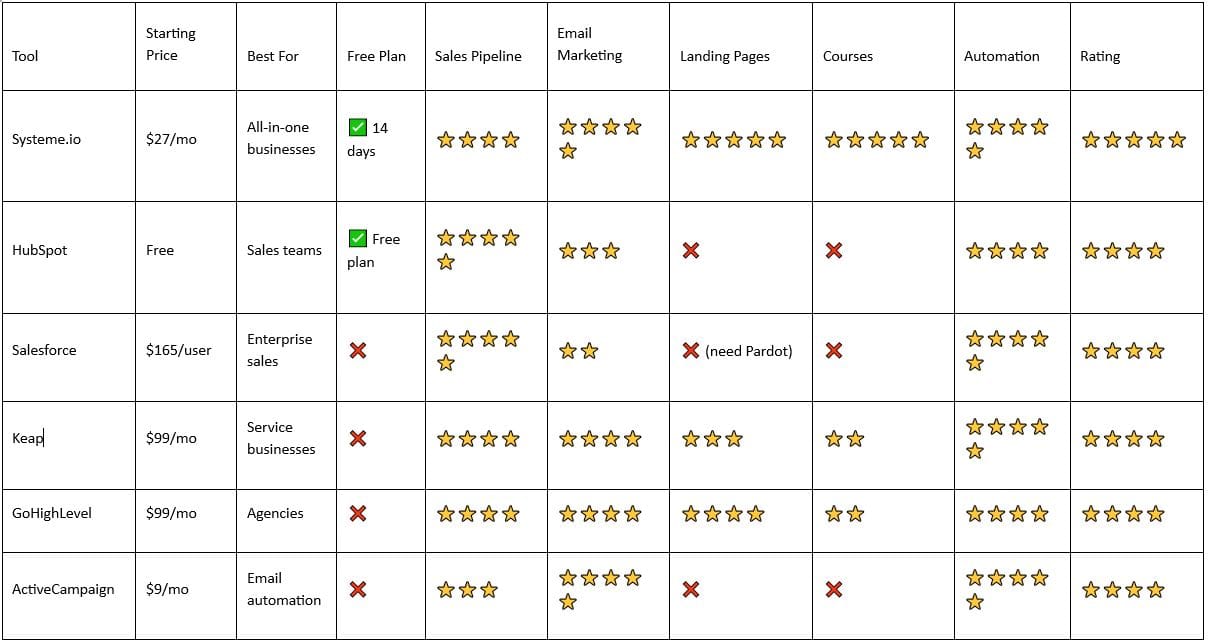
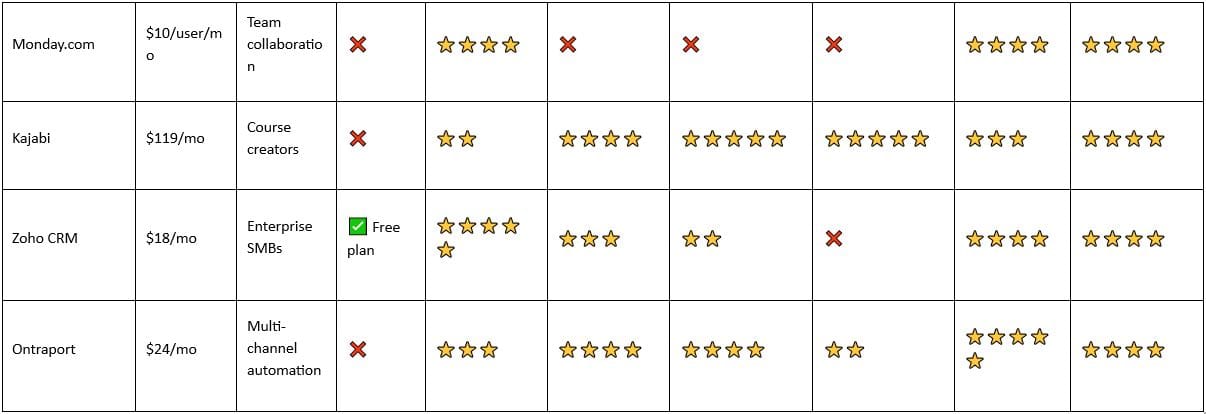
Which Alternative Is Right for You?
"If you need everything in one platform..."
→ Go with Systeme.io. It's the only platform that truly replaces Pipedrive + email + landing pages + courses + automation. Perfect for solopreneurs, coaches, and small agencies that are tired of managing multiple tools.
"If you're a small sales team that wants more power than Pipedrive..."
→ Start with HubSpot's free tier. It includes better automation and is easier to scale. The free tier is genuinely useful; upgrade to paid only when you hit limits.
"If you're a 50+ person enterprise with complex sales operations..."
→ Use Salesforce. It's expensive and complex, but it does enterprise sales better than anyone. Pipedrive simply can't scale to this level.
"If you're a service provider (coach, consultant, contractor)..."
→ Choose Systeme.io or Keap. Both handle the mix of sales, automation, and client management. Systeme.io is newer and cheaper; Keap has a 15-year track record.
"If you're an agency managing multiple client accounts..."
→ Use GoHighLevel. White-label reselling and client sub-accounts are built-in. It's designed specifically for your use case.
"If you're purely focused on email automation + CRM..."
→ Pick ActiveCampaign. It does email marketing and automation better than anyone. If you also need landing pages, add
Leadpages or Unbounce.
"If you're a course creator or digital product business..."
→ Choose Kajabi or Systeme.io. Kajabi is more polished but more expensive; Systeme.io is cheaper and nearly as powerful.
"If you have a sales team (3+ people) that needs collaboration..."
→ Use Monday.com. It combines Pipedrive's visual pipeline with excellent team collaboration. Integrate it with your email and automation tools.
"If you want enterprise power at SMB prices..."
→ Deploy Zoho CRM. It's incredibly powerful and affordable. Takes time to learn, but the investment pays off.
"If you need complex automation across email, SMS, and landing pages..."
→ Try Ontraport. It's the middle ground between Systeme.io's simplicity and Salesforce's complexity. Great for multi-channel campaigns.
Why You Should Switch From Pipedrive in 2026
Pipedrive is brilliant at one thing: visual sales pipeline management.
But let's be honest — you're not just managing a sales pipeline anymore. You're running a business.
In 2026, the platforms that win are all-in-one systems that handle:
Sales pipeline AND email marketing
CRM AND course hosting
Deal tracking AND landing page building
Automation AND customer support
Pipedrive is missing 4 out of 6.
Here's why switching makes sense:
1. Tool sprawl is costing you money — Pipedrive + email tool + landing pages + courses = 100–300/month in separate tools. A single all−in−one like Systeme.io costs 27–127/month.
2. Integration headaches are slowing you down — Every integration between tools is another point of failure. All-in-one platforms work seamlessly.
3. Your customers expect seamlessness — When leads come in, they should automatically flow into your email sequence, get scored, and trigger your sales process — without manual work.
4. Pipedrive's automation is basic — If you want conditional workflows, complex branching, or multi-step sequences, Pipedrive simply can't do it.
5. You're losing revenue — Without automation, you're manually following up. Automated systems close deals faster.
Make the Switch Today
Ready to outgrow Pipedrive?
If you've read this far, you already know Pipedrive isn't scaling with your business. The question is: which platform is right for you?
Use this quick decision framework:
1 Do you need everything (sales + email + courses + funnels) in one platform? → Try Systeme.io free for 14 days
2. Are you a small sales team that wants better automation? → Start with HubSpot's free tier
3. Are you an agency? → Test GoHighLevel
4. Are you a course creator? → Try Kajabi
5. Do you want pure automation power? → Use ActiveCampaign
Don't stay in Pipedrive just because it's familiar. The platform you choose today will either enable or limit your growth in 2026.
14-day free trial. All features included. No credit card required.
FAQ: Common Questions About Pipedrive Alternatives
What is the best free alternative to Pipedrive?
HubSpot's free CRM is genuinely useful — you get unlimited contacts, basic CRM, and limited automation at no cost. For a full all-in-one with a free trial (not forever free), Systeme.io's 14-day free trial gives you access to everything including email, landing pages, and courses.
Why are companies leaving Pipedrive?
Three main reasons: (1) Limited features — It's a great sales CRM, but you need 4–5 other tools, (2) Growing tool fatigue — Managing multiple integrations is painful, (3) Missing automation — Pipedrive's automation is basic compared to modern all-in-one platforms.
Is Systeme.io really better than Pipedrive?
For most growing businesses? Yes. Systeme.io includes everything Pipedrive does (sales pipeline) plus email, landing pages, courses, and advanced automation. If you're only managing sales deals and don't need email or courses, Pipedrive's visual pipeline is still superior.
Can I migrate from Pipedrive to Systeme.io?
Yes. Systeme.io has CSV import capabilities for your contacts. You can export your Pipedrive data and import it. Deals don't migrate automatically, but contacts and companies do.
Is Systeme.io easier to use than Pipedrive?
Yes. Pipedrive has a slightly simpler interface for pure sales pipeline management, but Systeme.io is remarkably intuitive for an all-in-one platform. Most users get productive in 1–2 days.
How long does it take to switch from Pipedrive?
For email and contacts: A few hours to migrate your data.
For full setup: 1–2 days to configure your pipeline, automations, and email sequences.
Total time to productivity: 3–5 days (much faster than Salesforce or HubSpot's professional plan).
Do I need to hire help to migrate?
No. For simpler platforms like Systeme.io, you can do it yourself. The learning curve is shallow enough that most non-technical founders can set it up solo.
What about Pipedrive's integration with other tools?
Pipedrive integrates with hundreds of apps via Zapier. However, if you choose an all-in-one like Systeme.io, you need far fewer integrations, so data flows more seamlessly.
This post contains affiliate recommendations and links. I only promote products and services I personally use, trust, and believe will genuinely benefit my audience. If you purchase through my links, I may earn a commission at no extra cost to you. This compensation helps support my work and allows me to continue providing valuable content. Thank you for your support and trust.
Leave a reply
Copyright © 2022 SuePats.com - nuBeginning.com | All Rights Reserved | PRIVACY POLICY - TERMS & CONDITIONS - DISCLAIMER