
How To Launch A Digital Product Business This Week Using Done-For-You Content
Introduction: Why Most People Never Launch
You want to start a digital product business.
You know it's possible. You know people are making money with it.
But you keep waiting.
"I'll start next month when I have more time."
"I need to finish my product first."
"I should learn more about marketing."
"I'll start when I have the perfect brand."
Meanwhile, weeks become months.
Months become years.
And you're still thinking about it instead of doing it.
Why This Happens
The startup paralysis is real.
Too many decisions. Too many options. Too much to figure out.
Most people never launch because the overwhelm is paralyzing.
They think they need:
A finished product (months of work)
A professional brand (weeks of design)
A complete marketing system (weeks of learning)
A beautiful website (days of setup)
Months of planning before day 1
This is all backwards.
The Real Path
Successful digital product entrepreneurs do this:
Week 1: Quick setup (accounts, brand, basics)
Week 2: Create or source product (write, compile, source)
Week 3: Build landing page and email sequences
Week 4: Launch and make first sales
Not months. Four weeks.
And if you use done-for-you content and templates?
One week.
What You'll Learn
✅ Why "done-for-you" collapses your timeline
✅ The 7-day launch system (day by day)
✅ What each day looks like (specific actions)
✅ How to avoid analysis paralysis
✅ How to make your first sale
✅ Why this actually works
By the end of this guide, you'll have a complete blueprint.
And you'll be ready to launch this week.
Part 1: The Problem With Traditional Launches
The Traditional Approach (The Long Way)
Month 1: Planning
Week 1-2: Research and brainstorm
Week 3-4: Create business plan
Total: 30+ hours
Month 2: Product Creation
Week 1-2: Outline course/product
Week 3-4: Create content
Total: 40-60 hours
Month 3: Branding
Week 1-2: Design logo and brand
Week 3-4: Create website
Total: 20-30 hours
Month 4: Marketing Setup
Week 1-2: Create sales pages
Week 3-4: Write email sequences
Total: 20-30 hours
Month 5: Pre-Launch
Week 1-2: Create graphics and content
Week 3-4: Setup automation
Total: 15-20 hours
Month 6: Launch
Finally, you launch
6 months later
150+ hours invested
$0 revenue
Most people quit during months 1-3.
They run out of motivation before they ever launch.
Why The Traditional Approach Fails
Problem 1: Too Much Upfront Work
Before you can sell anything, you need:
Finished product (40-60 hours)
Sales page (5-10 hours)
Email sequences (10-15 hours)
Graphics and branding (15-20 hours)
Total: 70-105 hours before your first sale
At $50/hour value, that's 3,500−5,250 invested before revenue.
Most people can't justify that.
Problem 2: Perfectionism Trap
The traditional path enables perfectionism:
"I'll launch when the product is perfect"
"I'll launch when the website looks right"
"I'll launch when everything is ready"
Perfect never comes.
Analysis paralysis sets in.
You're 3 months in, haven't launched, and you quit.
Problem 3: No Feedback Until Too Late
Traditional approach:
Spend months building in isolation
Launch with finished product
Find out nobody wants it
Wasted 3+ months
Fast approach:
Get to market in weeks
Get customer feedback immediately
Iterate based on real data
Launch what sells
Problem 4: Momentum Loss
Starting in Month 1, launching in Month 6:
Month 1 energy: High (excited!)
Month 2 energy: Medium (still excited)
Month 3 energy: Low (overwhelmed)
Month 4 energy: Declining (losing faith)
Month 5 energy: Critical (almost quit)
Month 6 energy: May not launch
Most projects die in Month 3-4.
The momentum dies before you launch.
Part 2: The Done-For-You Shortcut
What Changes With Done-For-You Content
Traditional approach:
Create everything from scratch
Everything takes time
Everything requires skill
Everything is overwhelming
Done-for-you approach:
Content already created
Templates already designed
Sequences already written
You customize and launch
Time difference: 150+ hours down to 10-15 hours
Result: 1 week instead of 6 months
What "Done-For-You" Includes
1. Pre-Built Templates (Saves 30+ Hours)
Traditional:
Design sales page from scratch (10 hours)
Design email templates (8 hours)
Design social graphics (10 hours)
Create Canva templates (5 hours)
Total: 33 hours
Done-for-you:
Download templates (1 hour)
Customize with your colors (1 hour)
Total: 2 hours
Time saved: 31 hours
2. Pre-Written Email Sequences (Saves 20+ Hours)
Traditional:
Write welcome sequence (5 hours)
Write product launch sequence (5 hours)
Write nurture sequence (5 hours)
Write promotional sequence (5 hours)
Total: 20 hours
Done-for-you:
Download sequences (10 minutes)
Customize with your product (30 minutes)
Add to email platform (10 minutes)
Total: 50 minutes
Time saved: 19 hours
3. Pre-Built Content Calendar (Saves 15+ Hours)
Traditional:
Plan 4 weeks of content (10 hours)
Write social captions (10 hours)
Design graphics (8 hours)
Schedule posts (3 hours)
Total: 31 hours
Done-for-you:
Download calendar (10 minutes)
Adjust for your niche (1 hour)
Copy captions to your template (30 minutes)
Total: 2 hours
Time saved: 29 hours
4. Pre-Written Scripts & Copy (Saves 15+ Hours)
Traditional:
Write 50+ caption formulas (10 hours)
Write CTA scripts (5 hours)
Write sales page copy (10 hours)
Total: 25 hours
Done-for-you:
Download scripts (20 minutes)
Customize for your product (1 hour)
Total: 1.3 hours
Time saved: 24 hours
5. Pre-Built Brand Kit (Saves 10+ Hours)
Traditional:
Choose colors (2 hours)
Choose fonts (2 hours)
Design logo (5 hours)
Create brand guidelines (2 hours)
Total: 11 hours
Done-for-you:
Download brand kit (5 minutes)
Keep or customize (1 hour)
Total: 1 hour
Time saved: 10 hours
The Total Time Collapse
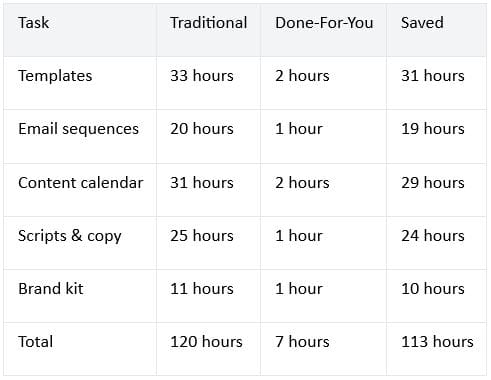
That's not 6 months.
That's 1 week.
Part 3: The 7-Day Launch System
Day 1: Define & Setup (2 Hours)
Morning (1 Hour)
Action 1: Define Your Product (20 minutes)
Answer these questions:
What problem does your product solve?
Who needs it (specific audience)?
What will you charge? (
27−
27−297 range)
What will it include? (simple list)
Example:
Problem: "Coaches don't know how to build email lists"
Audience: "Fitness coaches and wellness experts"
Price: $97
Includes: Templates, scripts, email sequences, case studies
Action 2: Choose Your Business Name (20 minutes)
Requirements:
Simple and memorable
Related to your niche
Available on Instagram
Easy to spell
Example: "Email Coach Templates" or "Fitness Business Scripts"
Action 3: Create Social Accounts (20 minutes)
Set up:
Instagram business account
Email marketing account (ConvertKit, Flodesk, Beehiiv)
Simple website/landing page platform (Carrd, Webflow)
Output: Clear product definition, business name, accounts created
Afternoon (1 Hour)
Action 4: Download Done-For-You Content (30 minutes)
Get your kit with:
Templates (100+)
Email sequences (pre-written)
Scripts (50+)
Content calendar
Brand kit
Sales page templates
Action 5: Customize Brand Kit (30 minutes)
Download brand colors and fonts
Apply to your accounts (Instagram, email)
Update profile pictures and headers
Write your bio
Output: All accounts set up with brand, content downloaded and ready
Day 2: Create Your Product (2-3 Hours)
Option A: Create From Scratch (3 Hours)
If creating new product:
Outline your product (1 hour)
What are main topics/modules?
What will people learn?
How is it organized?
Simple outline is enough
Create content (1.5 hours)
Write tips and frameworks
Compile resources
Create simple visuals
Use templates from kit
Package it (30 minutes)
Create PDF or file
Add cover page
Professional formatting
Done
Option B: Source Existing Product (1 Hour)
If reselling MRR product:
Buy MRR product (10 minutes)
Download the file
Check quality
Verify resale rights
Customize it (30 minutes)
Add your intro
Add your branding
Add bonuses (optional)
Make it feel yours
Package it (20 minutes)
Create sales page graphics
Add to delivery system
Test everything
Output: Finished product, tested and ready to sell
Day 3: Create Sales Page (1.5-2 Hours)
Morning: Write Sales Copy (45 Minutes)
Using templates from kit, write:
Headline (10 min)
Benefit-focused
Example: "The Complete Email List Building System for Coaches"
Problem statement (10 min)
What pain do they feel?
Example: "You're struggling to build an email list..."
Solution/benefits (15 min)
What will they get?
Bullet point list
What's included (10 min)
List all components
Be specific
Afternoon: Design Sales Page (45 min - 1 hour)
Using templates from kit:
Choose template (10 min)
Download sales page template
Fill in sections (30 min)
Add your headline
Add your copy
Add benefits
Add price
Add urgency/CTA (20 min)
Create call-to-action button
Add deadline (if any)
Test the link
Output: Professional sales page ready to drive traffic
Day 4: Setup Email System (1.5-2 Hours)
Morning: Create Email Sequences (45 Minutes)
Using pre-written sequences from kit:
Welcome sequence (15 min)
Download sequence
Customize with your name
Add to email platform
Product launch sequence (20 min)
Download sequence
Customize with your product
Add sales page link
Set up timing
Test (10 min)
Send to yourself
Check formatting
Verify links work
Afternoon: Setup List Building (45 min - 1 hour)
Create lead magnet & setup:
Simple lead magnet (20 min)
Free template or guide
Use templates from kit
Make it valuable
Create PDF
Landing page (15 min)
Simple page offering free resource
Email signup form
Thank you page
Automation (20 min)
Setup email delivery
Test signup flow
Verify email sends
Output: Email system ready, lead magnet live, automation working
Day 5: Create Content & Marketing (2 Hours)
Morning: Prepare Social Content (1 Hour)
Using content calendar from kit:
Download calendar (10 min)
4 weeks of pre-planned posts
Customize (30 min)
Adjust for your niche
Update with your examples
Personalize
Schedule posts (20 min)
Add to scheduling tool (Buffer, Later)
Schedule first 2 weeks
Set and forget
Afternoon: Create Launch Graphics (1 Hour)
Using templates from kit:
Product announcement graphics (20 min)
Download Instagram templates
Add product image/design
Add text
Sales page graphics (20 min)
Download graphics
Customize colors
Add benefit headlines
Email graphics (20 min)
Download email templates
Add product info
Professional look
Output: 2 weeks of content scheduled, graphics ready for launch
Day 6: Setup Payment & Delivery (1.5 Hours)
Morning: Payment Processing (45 Minutes)
Setup payment system:
Choose payment platform (10 min)
Gumroad (easiest)
Stripe + email (most control)
SendOwl (professional)
Create product listing (20 min)
Add product info
Set price
Upload product file
Create sales page
Test payment (15 min)
Make test purchase
Verify everything works
Check automation
Afternoon: Setup Delivery (45 Minutes)
Ensure product reaches customers:
Automatic delivery (15 min)
Payment platform sends file
Or email sends link
Test the flow
Create confirmation email (20 min)
Thank you message
Download instructions
Next steps
Customer support (10 min)
How will you answer questions?
Email address for support
FAQ document
Output: Payment system live, delivery automated, ready for customers
Day 7: Launch & Promote (2-3 Hours)
Morning: Final Check (30 Minutes)
Verify everything:
Sales page works (click link)
Payment processes (test purchase)
Product delivers (check email)
Emails send (test signup)
Social accounts look professional
Afternoon: Launch (2.5 Hours)
Tell the world:
Email your network (30 min)
Send launch email
Tell friends and family
Ask for shares
Post on social media (45 min)
Instagram post announcing product
Multiple stories mentioning it
Link in bio prominent
Pin important post
Reach out personally (1 hour)
DM relevant people
Share with interested people
Ask for testimonials
Request referrals
Monitor and respond (15 min)
Answer comments
Respond to inquiries
Engage with audience
Output: Launched, promoting, waiting for first sales
Part 4: How To Make Your First Sale
The First Week Strategy
Day 1-3 of launch:
Tell your warm network:
Email list (if you have one)
Personal friends and family
Colleagues and connections
Past clients
Why: These people know you, trust you, are most likely to buy.
Realistic expectation: 2-10 sales from warm network in first 3 days
Revenue: 54−970 (at $97 price point)
Day 4-7 of launch:
Expand to cold traffic:
Social media posts (growing audience)
Content about the problem
Stories and engagement
Link in bio
Why: New people discovering you, interested in your niche
Realistic expectation: 2-5 additional sales from social traffic
Revenue: 54−242 additional
Week 2+:
Build systems:
Email sequences promoting product
Consistent social content
Affiliate program (optional)
Paid ads (if profitable)
Realistic expectation: 5-20+ sales per week as you scale
The Messaging That Sells
What NOT to say:
"I just created this product"
"I hope you like it"
"It's not perfect but..."
"I'm nervous about launching"
What TO say (using kit scripts):
"Here's the solution to [problem]"
"I've compiled everything that works"
"This is what I wish I had when starting"
"Proven to help [specific result]"
Example launch email:
Subject: "New: Email List Builder's Complete System"
Body: "I created this because coaches kept asking me the same question: 'How do I build an email list that actually converts?'
So I compiled everything—all the templates, sequences, scripts, and frameworks I've used to build lists for my own business.
It's called [Product Name], and it includes:
50+ done-for-you email templates
5 complete email sequences
All the scripts I use
Real case studies
I'm offering it for just $97 (early bird price).
Get it here: [link]"
Why This Works
You're not claiming to be an expert.
You're solving a specific problem that people are asking about.
You're not overselling.
You're being clear and direct about what it is.
You're creating urgency.
"Early bird price" (or limited time) makes people act now instead of later.
Part 5: Common Obstacles & Solutions
Obstacle 1: "I Don't Have An Audience"
The myth: You need an existing audience to launch.
The reality: You build audience as you launch.
Solution:
Week 1: Email to warm network
Week 2-3: Share on social media
Week 4: Ask for referrals
Week 5+: Audience growing organically
Your first 10-20 customers come from:
Personal relationships (friends, family, network)
Direct outreach (DMs to interested people)
Small social media presence
You don't need 10,000 followers to make sales.
You need 100 interested people.
Obstacle 2: "My Product Isn't Perfect"
The myth: You need a perfect product to launch.
The reality: Perfect is the enemy of done.
Solution:
Get feedback from early customers
Improve based on what people actually want
Version 1 is good enough
Version 2 (after feedback) is great
Done and imperfect beats perfect and never launched.
Obstacle 3: "I Don't Know If People Want This"
The myth: You need to validate demand before creating.
The reality: Fast launch reveals real demand faster than research.
Solution:
Launch with something reasonable
Watch who buys
Ask customers what they want
Create next product based on feedback
Sales data is more accurate than surveys.
Obstacle 4: "I Don't Know How To Market"
The myth: You need to be a master marketer to succeed.
The reality: Simple, direct messaging works.
Solution:
Use scripts from done-for-you kit
Tell people what you're selling
Explain the benefit
Include a link
Done
You don't need fancy marketing.
You need clarity and a link.
Obstacle 5: "What If Nobody Buys?"
The myth: If nobody buys, you failed.
The reality: Zero sales means you need to adjust.
Solutions:
Better marketing (tell more people)
Better sales page (clearer benefits)
Better pricing (maybe too expensive)
Better product (maybe not solving real problem)
Better targeting (wrong audience)
Nobody's first product is a home run.
Adjustments are normal.
Part 6: Week 1 Timeline Summary
The Complete 7-Day Breakdown
Day 1 (Monday): Setup & Define
Time: 2 hours
Output: Accounts created, product defined, brand set
Day 2 (Tuesday): Create Product
Time: 2-3 hours
Output: Finished product (created or sourced)
Day 3 (Wednesday): Sales Page
Time: 1.5-2 hours
Output: Professional sales page ready
Day 4 (Thursday): Email System
Time: 1.5-2 hours
Output: Email sequences, lead magnet, automation
Day 5 (Friday): Content & Marketing
Time: 2 hours
Output: Content scheduled, graphics ready
Day 6 (Saturday): Payment & Delivery
Time: 1.5 hours
Output: Payment processing live, delivery automated
Day 7 (Sunday): Launch & Promote
Time: 2-3 hours
Output: Live, promoted, ready for sales
Total Time: 14-16 hours
Total Cost: $67 (kit) + optional domain/hosting
Result: Complete digital product business live in 7 days
Conclusion: You Can Do This This Week
Here's the reality:
✅ You can launch this week
✅ You don't need months of planning
✅ You don't need to be an expert
✅ You don't need a massive audience
✅ You don't need perfection
✅ You need 7 days and a plan
The plan is above.
The tools are in the kit.
Everything else is just execution.
Templates. Sequences. Scripts. Calendar. Systems.
Everything pre-built. Everything ready to customize. Everything ready to launch.
No waiting. No learning curves. No overwhelm.
Just 7 days from nothing to launched.
This week is your launch week.
Will you do it?
This post contains affiliate recommendations and links. I only promote products and services I personally use, trust, and believe will genuinely benefit my audience. If you purchase through my links, I may earn a commission at no extra cost to you. This compensation helps support my work and allows me to continue providing valuable content. Thank you for your support and trust.
Leave a reply
Copyright © 2022 SuePats.com - nuBeginning.com | All Rights Reserved | PRIVACY POLICY - TERMS & CONDITIONS - DISCLAIMER